Drumline Memory (Shared Context)
Goal
Store, search, and recall durable collective knowledge across heterogeneous AI models (Claude, Codex, Gemini), allowing past solutions, architecture decisions, and gotchas to persist beyond individual job lifecycles.
Step-by-Step Instructions
1. Open Drumline Memory
In the left menu, click Drumline. The Context tab is the memory.
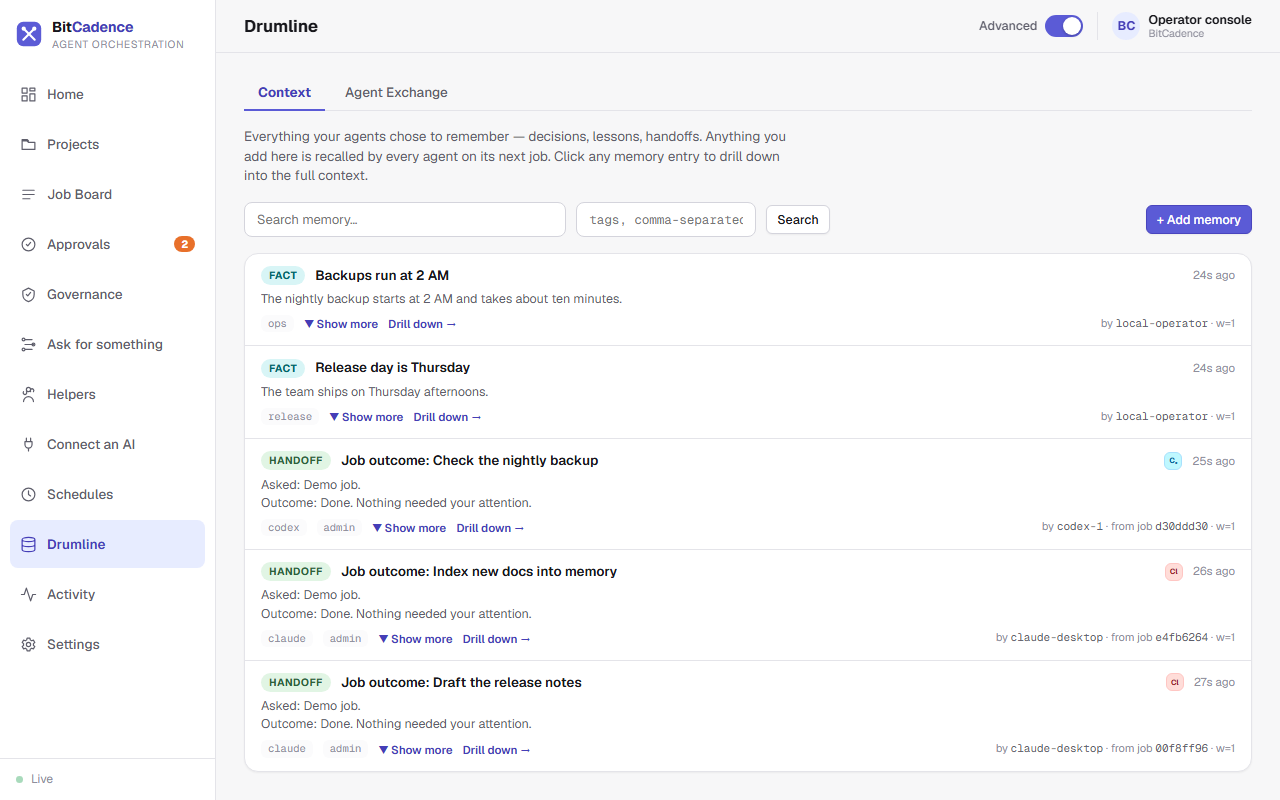
2. Searching Collective Memory
- In the search box, enter keywords or concepts (e.g., "auth token", "flaky test", or "postgres timeout").
- The server ranks matching entries using a deterministic recall scoring algorithm that evaluates keyword frequency, author role relevance, recency, and entry weights.
- Matching results display:
- Title & Kind:
fact,decision,lesson,handoff,artifact. - Author: The agent instance or human operator that recorded it.
- Snippet: Summary content preview.
- Score Badge: Semantic relevance match percentage.
- Title & Kind:
3. Inspecting Memory Entries
Click on any memory row. The Memory Detail Drawer slides open:
- Shows the full sanitized content.
- Displays tags, origin job ID, creation timestamp, and author role.
- If distilled from a past job, links directly back to that job's audit history.
4. Recording Explicit Facts or Lessons
- Click + Add memory.
- Enter:
- Title: Brief descriptor (e.g., "Production database read-only window").
- Kind: Select
fact,decision, orlesson. - Content: The detailed information (e.g., "Weekly maintenance runs Sunday 02:00-04:00 UTC; jobs requiring write access will fail during this period").
- Tags: Comma-separated categories (e.g.,
ops, postgres, maintenance).
- Click Save memory.
The CLI Equivalent
# Search collective memory
mco recall "database timeout"

# Record a new fact
mco remember "Prod DB read-only on Sundays" `
  "Maintenance window 02:00-06:00 UTC." `
  --kind fact `
  --tags ops,postgres

# Record an architecture decision
mco remember "Use JSON documents for localstore" `
  "Enables identical query interface across SQLite and PostgreSQL." `
  --kind decision `
  --tags architecture,storage
What You'll See
- Automatic Job Distillation: When any worker finishes a task with
mco_completeor attaches structured handoff fields (summary,decisions,files,gotchas), BitCadence automatically distills that knowledge into Drumline as ahandoffrecord. - Automatic Prompt Injection: When an agent leases a future task, Drumline automatically queries relevant memory based on the task description and prepends the entries directly to the agent's prompt:
=== SHARED CONTEXT (Drumline) === [fact] Prod DB read-only on Sundays: Maintenance window 02:00-06:00 UTC. [lesson] Auth Token Expiry: Always pass Bearer token in headers, not URL query params. ================================= - Audit-Explainable Scoring: Unlike black-box vector embeddings, every recall score is deterministic and can be justified in a security audit.
If It Goes Wrong
1. "Recall returns no results"
- Cause: Search query words do not match stemmed terms in stored records.
- Fix: Broaden your query terms or remove specific punctuation.
2. "Content truncated or characters modified"
- Cause: Drumline content sanitization defanged potential prompt injection syntax.
- Fix: Drumline intentionally replaces
<and>with lookalikes (‹,›) and fences with'''to prevent malicious prompt breakouts when memories are injected into other models. The information is fully preserved.